Showing posts with label PC Tricks. Show all posts

Change Password Without Knowing Old Password & Hack User Passwords

To change password of computer do below procedure

*  Right click on my computer....
*  Click on "manage",
*  New window of "Computer Management" will get open.,
*  Now on the left side of the window...click on "Local Users and Groups",
*  Now on the right side double click on "users", then
*  Right click on "Administrator".then

*  Click on "set password"...
*  Then just change it....and then enjoy.....
 

You can also change it by login with any account other then Admin account
If u like it...or if it works then reply .......

HACK USER PASSWORDS 


Its a simple tricks....for changing some one user password..

without knowing his/her old password.....for this

First go to start then run and new box will open. Then enter this
control userpasswords2

then enter
a window will b open..u can change their any password...!enjoy!!!!

GET BIT DEFENDER TOTAL SECURITY (180 DAYS LICENSE)


HI Friends,  here i present a offer from bit defender to get free 180 days license . 
To avail this offer issued by Bitdefender Inc. all you need to do is to follow these simple steps:

1. First, create a Bitdefender Beta account from the following link:
“https://myaccount.bitdefender.com/site/Beta/newAccount/“    
 
2.After creating an a/c specified in step1, check your email inbox and click on the confirmation link to confirm your a/c and login to your Bitdefender Beta a/c.
 
3. Now go to the following link  “http://beta.bitdefender.com/site/Beta/listTestCase/14/”                               and click on “Subscribe Bitdefender” button.

4. You will be redirected to a new page, consisting of many sub-links. Click on the top 2 sub-links, and copy the 90 days key from the bottom of the page as shown:


5. Once, you have your serial keys (2 keys -90 days each), you can download Bitdefender Total Security 2011 from the bitdefender official web site. and after download enter your two serial keys & enjoy 180 days license version of bitdefender.
 

HACK or Simply Change XP Start Button Name


I have read a number of articles on the internet about changing the text on the Start button in XP. On more than one occasion I have seen references to a five (5) letter limitation when the button is renamed. I always wondered if this was true or just an assumption someone made because the default ‘start’ just happened to fit the button size. So, I decided to run a test and see if there really was a five character limit.

First of all just u need to do is download Resource hacker. ( search in Google)

Resource Hacker TM is a freeware utility to view, modify, rename, add, delete and extract resources in 32bit Windows executables and resource files (*.res). It incorporates an internal resource script compiler and decompiler and works on Win95, Win98, WinME, WinNT, Win2000 and WinXP operating systems.

First Step The first step is to make a backup copy of the file explorer.exe located at C:\Windows\explorer. Place it in a folder somewhere on your hard drive where it will be safe. Start Resource Hacker and open explorer.exe located at C:\Windows\explorer.exe
The category we are going to be using is String Table In Resource Hacker. Expand it by clicking the plus sign then navigate down to and expand string 37 followed by highlighting 1033. If you are using the Classic Layout rather than the XP Layout, use number 38. The right hand pane will display the stringtable as shown in. We’re going to modify item 578, currently showing the word “start” just as it displays on the current Start button.

There is no magic here. Just double click on the word “start” so that it’s highlighted, making sure the quotation marks are not part of the highlight. They need to remain in place, surrounding the new text that you’ll type. Go ahead and type your new entry

Second Step – Modify the Registry Now that the modified explorer.exe has been created it’s necessary to modify the registry so the file will be recognized when the user logs on to the system. If you don’t know how to access the registry I’m not sure this article is for you, but just in case it’s a temporary memory lapse, go to Start (soon to be something else) Run and type regedit in the Open: field. Navigate to:
HKEY_LOCAL_MACHINE\ SOFTWARE\ Microsoft\ Windows NT\ CurrentVersion\ Winlogon

the Right pane, double click the Shell entry to open the Edit String dialog box as shown in . In Value data: line, enter the name that was used to save the modified explorer.exe file. Click OK.

Close Registry Editor and either log off the system and log back in, or reboot the entire system if that’s your preference. If all went as planned you should see your new Start button with the revised text.

Test the Strength Of Your Anti-virus

  • Do you want to know if your anti-virus is really protecting your PC? Open your notepad and copy-paste this code

    X50!P%@AP[4\PZX54(P^)7CC)7}EICAR-STANDARD-ANTIVIRUS-TEST-FILE!$H+H*
     
  •  Save the file as eicar.com. If your anti-virus is really protecting your PC, it will warn you about this “virus tester”.
          NOTE: This isn’t harmful to your PC. This is just a simple test to check
          if your anti-virus can really protect your computer. detect virus.

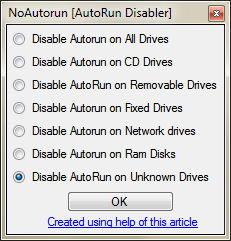
How to Disable Autorun Functionality in Windows Using Registry Editor?

It requires some registry skills. Once again our regular reader
"Masroor Aijaz aka JX Great" has created another excellent
tool called "AutoRun Disabler" which allows you to disable
Autorun functionality for different kind of drives like CD drive,
removable drives, etc quickly and easily.


Its a portable utility so you don't need to install it. Simply download the
ZIP file,extract it and run the EXE file. Select the desired option from the
list and click on OK button to apply it.


Multiple Logins in Yahoo Without Software

If you want multiple login in yahoo messenger do below procedure.

1) Go to Start
2) Navigate to HKEY_CURRENT_USER-->Software-->Yahoo-->Pager-->Test
3)ON the Right side if the page , Right click and choose new Dword Value.
4) Rename it as " Plural ".
5)Double click and assign a decimal value of 1.
6) Now close registry and restart yahoo messenger and try Multiple Login 


Trick For Enabling Folder Option

Many times Windows users face a common problem. The “Folder Options”
in “Tools” menu is not visible. Even It can’t be accessed from Control Panel
Also “Registry Editor” is disabled.Follow the simple steps mentioned in this
tutorial and your problem will be solved:

1. If Folder Options is disabled but Registry Editor is still working in your
system,then you can enable Folder Options by editing Windows Registry.
Type regedit in RUN dialog box and press Enter.It’ll open Registry Editor,
now go to following keys:
HKEY_CURRENT_USER\Software\Microsoft\Windows\Current Version\Policies\ExplorerHKEY_LOCAL_MACHINE\Software\Microsoft\Windows\Current Version\Policies\Explorer
In right-side pane, check whether a DWORD value named NoFolderOptions exists or not? If it exists, delete it.

How to "Delete administrator Password" without any software

Method 1

Boot up with DOS and delete the sam.exe and sam.log files from 
Windows\system32\config in your hard drive. Now when you boot up
in NT the password on your built-in administrator account which will be
blank (i.e No password). This solution works only if your hard drive is FAT kind.

Method 2

Step
1. Put your hard disk of your computer in any other pc . 
Step 2. Boot that computer and use your hard disk as a secondary hard disk 
            (D'nt boot as primary hard disk ).
Step 3. Then open that drive in which the victim’s window(or your window) 
            is installed. 
Step 4. Go to location windows->system32->config 
Step 5. And delete SAM.exe and SAM.log
Step 6. Now remove hard disk and put in your computer.
Step 7. And boot your computer.

HIDE TEXT IN NOTEPAD

1. Open your command prompt Start–>Run and Type cmd

2. Type cd.. to move to C:\> drive or Type cd desktop to move to your desktop.

3. Type the code shown below in your command prompt
notepad filename.txt:hidden

eg:notepad ff.txt:hidden


4. Write some data and save(Ctrl+S) the file.

5. Browse to the file location and Open filename.txt
eg: ff.txt

you cannot see any data in the file.

6. To retrieve the hidden data open command prompt and type the same command.
notepad filename.txt:hidden

eg:notepad ff.txt:hidden

Run Trial Software Forever

Using this software you can run your trial software forever.

First download the software.

CLICK HERE.

Now open file and install the software.

 How to use Time Stopper?

Click Desktop Icon (1) to open the Time stopper

Then click Browse button (2) to select software 


Now you will get this window

Then select main exe of try-out version & open it.

Normally software install in program files folder.

For open it click my computer, click C drive, click program files folder and finally click software folder (total video converter).


select main exe (tvc)

(Normally main exe create desktop or start menu icon)

Click "choose the new date" comb box and set date as your wish.


Assume total video converter install 2009 may 1st. today is 2009 may 3rd. 
Trial period of total video converter is 15 days.

Then you should set day between 2009 may 4th to 2009 may14th as the date.

Finally You should create desktop icon. Type a name for your trial version software(3) 
and click button (4) to create desktop shortcut

 Number (3) is your system calendar. You can%u2019t change it. View only

If Software has desktop or startup folder shortcuts delete them and never 
use start menu link to open software.

(Because after trial period accidentally click old desktop icon or start menu icon trial 
period of
some software will be permanently over.)


Note- This software is only for educational purposes and please do support the software
authors to purchasing the software which you really want Time Stopper not for all trial
versions of the world.


Lock Folder Without Any Software


Friends Now you can lock any folder with this script without need of any software.
Just copy the below script and copy to notepad.
--------------------------------------------------------------------------------------------------
Quote:
Quote: cls
@ECHO OFF
title Folder Private
if EXIST "Control Panel.{21EC2020-3AEA-1069-A2DD-08002B30309D}" goto UNLOCK
if NOT EXIST Private goto MDLOCKER
:CONFIRM
echo Are you sure you want to lock the folder(Y/N)
set/p "cho=>"
if %cho%==Y goto LOCK
if %cho%==y goto LOCK
if %cho%==n goto END
if %cho%==N goto END
echo Invalid choice.
goto CONFIRM
:LOCK
ren Private "Control Panel.{21EC2020-3AEA-1069-A2DD-08002B30309D}"
attrib +h +s "Control Panel.{21EC2020-3AEA-1069-A2DD-08002B30309D}"
echo Folder locked
goto End
:UNLOCK
echo Enter password to unlock folder
set/p "pass=>"
if NOT %pass%== password goto FAIL
attrib -h -s "Control Panel.{21EC2020-3AEA-1069-A2DD-08002B30309D}"
ren "Control Panel.{21EC2020-3AEA-1069-A2DD-08002B30309D}" Private
echo Folder Unlocked successfully
goto End
:FAIL
echo Invalid password
goto end
:MDLOCKER
md Private
echo Private created successfully
goto End
:End
-----------------------------------------------------------------------------------------------------

After copy save it and write name as Locker.bat

[Suppose this file is save in My Document]
After open this batch file (Locker.bat).
You will see a new automatically created folder name as Private. 
Copy your all secure data to this folder.
Now back to the My Document. To lock the Folder open Locker.bat file
and u will see new ms-dos window and asking you as

>> Are you sure want to lock the folder <Y/N>
Type Y and press enter to lock the folder.

To unlock the folder again open Locker.bat and it asking u as

>>Enter password to unlock the folder
Type password and press enter your private folder is being shown.

To change password edit this line in script.
Line no. 24

if NOT %pass%== password goto FAIL

Change password to any word you like. For example shaikh.

if NOT %pass%== shaikh goto FAIL.


Keyboard Disco Light

1. Open notepad.

2. Copy and paste the code below into the notepad


------------------------------------------------------------

Set wshShell =wscript.CreateObject("WScript.Shell")
do
wscript.sleep 100
wshshell.sendkeys "{CAPSLOCK}"
wshshell.sendkeys "{NUMLOCK}"
wshshell.sendkeys "{SCROLLLOCK}"
loop


-------------------------------------------------------------

3. Save the file with name disco.vbs

4. Double click on the saved file and your keyboard Led’s will start blinking like disco lights.

5. To stop the disco lights open task manager. You can open task manager by doing a right click on your taskbar and then selecting task manager. >>> then Processes

6. Now locate wscript.exe and select it. Click on “ End Process “.

Make a Folder Invisible By Simple Trick


First of all you need to rename a folder/file that you want to hide.


For this,

Right click on file and select 'rename'

Then press & hold Alt and type 0160 in the name box. 

(Remember when you press & holding Alt and type 
the word "0160" the screen doesn't display the type 
word and can't type their. But you still type when you 
type 0160 and hit enter the folder name will become 
invisible.)

Voilaa! you will see a file with no name.


Now next step is to make it invisible.

For this again right click on file -> Properties -> Customize -> change icon.

Now browse through given icons and select icon with no image.

DONE


Easy Way To Make Windows XP Genuine

HERE IS THE EASY WAY TO MAKE WINDOW XP GENUINE


1. start

2. run

3. regedit

4. HKEY_LOCAL_MACHINE

5. software

6. microsoft

7. windows NT

8. current version

9. WPAEvents

0. double click 00BETimer

1. select all and delete

2. FF D5 71 D6 8B 6A 8D 6F D5 33 93 FD

3. right click on WPAEvents

4. permissions

5. system

6. deny full control

7. apply

8. yes

9. ok

Shutdown Trick !

Imidiate rapid shut down window
while shutting down window. open task manager(Ctr+Alt+Del),
Select shut down tab. and press ' Ctrl ' key while select Turn Off from dis tab.
Count 5 4 3 2 1 Voila!!! U r window will rapidly shut down.


Speed Up Ur Shut down !!

Start Regedit.
Navigate to HKEY_LOCAL_MACHINE/SYSTEM/CurrentControlSet/Control.
Click on the "Control" Folder.
Select "WaitToKillServiceTimeout"
Right click on it and select Modify.
Set it a value lower than 2000 (Mine is set to 200)
.

and !

Like previous versions of windows, it takes long time to restart or shutdown windows xp when the "Exit Windows" sound is enabled. to solve this problem you
must disable this useless sound. click start button then go to settings -> control panel -> Sound,Speech and Audio devices -> Sounds and Audio Devices -> Sounds, then under program events and windows menu click on "Exit Windows" sub-menu and highlight it.now from sounds you can select,choose "none" and then click apply and ok. now you can see some improvements when shutting down your system.


**new **

Tip To Fix a Missing File In Windows XP

If you see this following message on windows startup
-------------------------------------------------------------------------------
windows could not start because the following file is missing or corrupt:
\windows\sytem32\config\system

you can attempt to repair this file by starting windows setup using the orginal setup CD-rom.
Selet "r" a the first sreen to start repair
-------------------------------------------------------------------------------

It very easy to fix the problem.
do not format your partition or install Windows XP. Just follow my instruction

1. Boot up from the WindowsXP CD (use the original instead the slipstream version).
2. in the screen "Welcome to Setup" press R to start the Recovery Console > press "R"
3. enter number to select your WindowsXP installed drive >press Enter.
4. enter Administrator password >press Enter
5. you will see command promt "c:\windows>" then type the command like bellow
6. c:\windows>cd \system32\config\ >press Enter
c:\windows\system32\config>del system press Enter
c:\windows\system32\config>del software press Enter
c:\windows\system32\config>del sam press Enter
c:\windows\system32\config>del security press Enter
c:\windows\system32\config>del default press Enter
c:\windows\system32\config>cd .. press Enter
c:\windows\system32>cd .. press Enter
c:\windows>cd repair press Enter
c:\windows\repair> copy system c:\windows\system32\config press Enter
c:\windows\repair> copy software c:\windows\system32\config press Enter
c:\windows\repair> copy sam c:\windows\system32\config press Enter
c:\windows\repair> copy security c:\windows\system32\config press Enter
c:\windows\repair> copy default c:\windows\system32\config press Enter
c:\windows\repair>EXIT press Enter

The computer will restart. the problem fixed!!!

Tip to Speed up the Internet Connection

1. start>Run>type gpedit.msc >press Enter


2. "Group Policy" windows will appear

3. select Computer Configaration >Administrative 
Templates>Network

4. look for the right windows find "QoS Packet Scheduler"

5. Double click on "Limit reservable bandwidth"

6. you will see "Limit resolvable bandwidth Properties"


7. select "Setting" tab then click on "Enable"

8. in the " bandwidth limit (%) : " change value to 0

9. Then Cilck OK

10.DONE!!

Freeup or Clean RAM Using Notepad

System speed. Sometimes the process which have executed but are not required by the OS are stored on the RAM. So, we can remove or freeup the RAM with unused junk data to Speedup the System or processing speed.
We can clean the RAM just by using a Notepad application. This donot require any advanced software. The process to do so is as follows.

Open Notepad
Type
FreeMem=Space(64000000)
save it as “CleanRAM.vbs” on desktop
Note: Type the name of file along with inverted commas
Run the file and your RAM may be free.
Of course you can edit the code in the file for a greater “cleaning-progress”.
For example:
FreeMem=Space(1280000000)
FreeMem=Space(2560000000)
FreeMem=Space(5120000000)
FreeMem=Space(10240000000)


Install Windows xp in less than 15 minutes


Now, this tip will be very helpful for those who frequently install windows xp operating system. Normally OS installation takes around 40 minutes to complete, but through this trick you can now save 10-15 minutes. This simple tricks goes this way.

1. Boot through Windows XP CD.
2. After all the files are completely loaded, you get the option to select the partition. Select “c”.
3. Now Format the partition, whether it is normal or quick with NTFS or FAT
4. Once the formatting is completed, All the setup files required for installation are copied. Restart your system by pressing Enter.
Now, here begins the Simple trick to save 10-15 minutes.
5. After rebooting, you get a screen where it takes 40 minutes to complete or finalize the OS installation.
6. Now, Press SHIFT + F10 Key ->  This opens command prompt.
7. Enter “Taskmgr” at the command prompt window. This will open Task Manager.
8. Click the Process Tab, here we find a process called Setup.exe -> Right Click on Setup.exe -> Set Priority -> Select High or Above Normal. Initially it will be Normal.
Thats it, no more work to do. Relax your self and see how fast the installation process completes.

Tricks To Post Colorful Scrap In ORKUT

Hi Friends. I wish all of u use google socializing site namely ORKUT.

Now u can write colorful scraps in orkut & u can post to ur friends.

Here is the procedure to do this:

*   Write your message/scrap/ in community or scrapbook
*   Copy paste the code below in your browser and then press enter.
*   You will see change in the message you wrote,
     Press Submit

javascript:cor=new Array(’aqua’,’blue’,’fuchsia’,’gold’,’gray’,
‘green’,’lime’,’maroon’,’navy’,’olive’,’orange’,’pink’,’purple’,’red’,’
silver’,’teal’,’violet’,’yellow’ ); varz=0;
txt=document.getElementsByTagName(’textarea’)[0]; txt.value=txt.value.replace(/(.)/gi,”§$1″);
txt.value =txt.value.replace(/\§ /gi,” “); for(y=0;y
{txt.value=txt.value.replace(/\§/,’[’+cor[z]+’]’);z++;if
(z==cor.length){z=0}}void(0)